# Introduction

What is Hover?

Hover is a non-custodial liquidity market built on the Kava EVM. It empowers users to rise above market volatility by engaging in permissionless lending and borrowing of digital assets. Users can lend assets to earn yield or borrow assets to gain leverage, all without relying on a third party.\
\
Deposits and withdrawals on Hover can be made instantaneously, providing a low-friction source of liquidity for users and dApps that wish to build atop Hover’s liquidity pools.\
\
Interest rates on Hover are dictated by supply and demand, providing uninterrupted insights into the market lending rates.\
\
Prior to launch, early adopters can earn enhanced yields with boosted APY by depositing in Hover’s Genesis Pools for a limited period.\
\
Lending on Hover is overcollateralized, where the amount that can be borrowed is determined by the market value of the underlying collateral. Borrowers can use their constantly updated Health Factor to assess their borrowing risk.


# Genesis Pools

## What are Genesis Pools?

Hover Genesis Pools are initial staking pools designed to reward early depositors before the protocol’s full launch.&#x20;

By depositing into the Hover Genesis Pools, users are given the opportunity for boosted APY throughout the Genesis Pool period. The available pools are KAVA, ATOM, and USDt.\
\
Hover Genesis Pools will be open for deposits from November 21st until the full protocol launch in Q1 2024, allowing depositors to supply their lending receipt tokens ([hTokens](/liquidity-market/supplying/htokens)) during that period. After this initial period, the pools will close to deposits and will be withdrawal-only.

Depositors have the option to remain in the pool for the duration of the Genesis Pool period, beginning the day the pools open, and will receive a protected yield during that period. As depositors withdraw, the token yield will be divided amongst the users remaining in the pool.

A total of 3% of Hover's token supply has been allocated for this Genesis Pool event. These will be distributed among the Genesis Pool depositors, proportional to their deposit amounts. The more you deposit into the Hover Genesis Pools, the greater your yield.

Genesis Pool yield will be given in esHOV and will be available to claim after TGE.


# How to Participate in the Genesis Pools

In order to participate, users must start by [supplying](/liquidity-market/supplying) KAVA, ATOM, or USDt to Hover's lending pools. Upon supplying, users are given a lending receipt token called an[ hToken](/liquidity-market/supplying/htokens) in exchange for their deposit. Users must then deposit the associated hTokens (hKAVA, hATOM, or hUSDt) into the Genesis Pools.

<figure><img src="https://2981697796-files.gitbook.io/~/files/v0/b/gitbook-x-prod.appspot.com/o/spaces%2FsMejAYcEclUBJe5Na8xo%2Fuploads%2FwWABnrWYIksOJKQtV9j5%2FIMG_4947.jpg?alt=media&amp;token=a1ec5319-a8b4-49b6-bc83-0724029dfb78" alt=""><figcaption></figcaption></figure>

Making the hToken deposit is a very important step. If the user makes the supply deposit but fails to deposit the hTokens into the Genesis Pool, they will not be able to receive the Genesis Pool yield.&#x20;

Please see this [Medium article](https://medium.com/@Hover_Market/how-to-deposit-into-hovers-genesis-pools-c0b1c6aee1de) for a step-by-step guide on how to make a deposit to the Genesis Pools. &#x20;


# How to Withdraw from the Genesis Pools

Users who wish to withdraw from the Genesis Pools and retrieve their deposited assets must first withdraw their [hTokens](/liquidity-market/supplying/htokens) from the Genesis Pools. Afterwards, the assets will be made available to withdraw on the main Overview page.

<figure><img src="https://2981697796-files.gitbook.io/~/files/v0/b/gitbook-x-prod.appspot.com/o/spaces%2FsMejAYcEclUBJe5Na8xo%2Fuploads%2FphHzJS3nPsKxfk2rYih9%2FIMG_4946.jpg?alt=media&amp;token=89e32d98-f5ac-439a-be62-24416f55be4c" alt=""><figcaption></figcaption></figure>

1. Under ***Opportunities***, find the *Genesis Pool* tab on the right side.
2. Scroll down to ***Withdraw*** and enter the number of hTokens you would like to withdraw, then click the yellow ***Withdraw*** butto&#x6E;***.***

<figure><img src="https://2981697796-files.gitbook.io/~/files/v0/b/gitbook-x-prod.appspot.com/o/spaces%2FsMejAYcEclUBJe5Na8xo%2Fuploads%2FlAeCjqRRLsaSXi8jfLy0%2Fimage.png?alt=media&amp;token=925e41c0-7650-4c8f-818f-18d8169b406b" alt=""><figcaption><p><em>Note: These hTokens have an exchange rate of 0.020000, or 50 hTokens per 1 token. To calculate the number of hTokens you need to withdraw, multiply the desired amount of the deposited asset by 50.</em></p></figcaption></figure>

3. After the hToken withdrawal is confirmed, return to the ***Overview*** page. There you'll find that your deposited asset is now available to withdraw. Click on the yellow ***Withdraw*** button on the right.&#x20;

<figure><img src="https://2981697796-files.gitbook.io/~/files/v0/b/gitbook-x-prod.appspot.com/o/spaces%2FsMejAYcEclUBJe5Na8xo%2Fuploads%2FYaYXFrV7AoAm7QgoDbRR%2Fimage.png?alt=media&amp;token=f0b8370e-9144-4a01-9672-3358839eaa32" alt=""><figcaption></figcaption></figure>

4. Enter the amount you wish to withdraw by using the slider bar to enter a percentage or by typing the exact number of tokens.
5. Click ***Withdraw*** and confirm in your wallet to complete the transaction.


# Liquidity Market

Supplying and Borrowing Assets

Hover provides a platform to allow your idle assets earn yield and work for you.\
\
Users can select any asset supported by the protocol and deposit it directly into Hover. These supplied assets are then lent out to other users, known as borrowers. The interest paid by borrowers generates yield for the suppliers. &#x20;

Hover’s protocol operates on an algorithmic basis, meaning only the original depositor and collateralized borrowers can withdraw funds. Assets can be withdrawn anytime, as long as they are not being used as collateral for an active loan.

***

Hover gives users the freedom to collateralize their deposited assets, allowing them to obtain a loan that accrues variable interest according to market demand. Unlike traditional loans, there are no fixed terms associated with Hover's lending service. Users have the liberty to repay the loan whenever they’d like, as long as their *Health Factor* stays above 1.

In the event the loan’s value drops below that of the collateral, the position would be liquidated and the funds are used to repay the depositors.


# Supplying

Hover provides a platform to allow your idle assets accrue yield and work for you.

Users can select any asset supported by Hover and deposit it directly into the protocol. These supplied assets are then lent out to other users, known as borrowers. The interest paid by borrowers generates yield for the suppliers. &#x20;

Hover’s protocol operates on an algorithmic basis, meaning only the original depositor and collateralized borrowers can withdraw funds. Assets can be withdrawn anytime, as long as they are not being used as collateral for an active loan.

## Deposit Assets

1. Under *Overview*, find the *Supply* tab on the right side of the window.&#x20;
2. Select the asset you would like to deposit using the drop-down list under *Select token*.&#x20;
3. Enter your desired amount or hit *Max* to supply the full amount of that asset in your connected wallet. Alternatively, you may use the slider below to deposit a percentage of the amount in your connected wallet.

   (*Note: When depositing KAVA, the amount available to deposit is 10 less than your total amount. This is to set aside at least 10 KAVA in your wallet to ensure you are able to cover transaction fees.)*
4. Click *Supply*. The deposit is recorded and begins accruing interest once confirmed.
5. Your wallet will receive hTokens that represent your supplied asset, in exchange for your deposit. These hTokens are valued at 0.020000 upon minting and will increase in accordance with the interest rate.

<figure><img src="https://2981697796-files.gitbook.io/~/files/v0/b/gitbook-x-prod.appspot.com/o/spaces%2FsMejAYcEclUBJe5Na8xo%2Fuploads%2FAkATeWtPiXNYir7wbTTe%2Fimage.png?alt=media&amp;token=8bd9027f-53db-46c9-91db-39af0c22e2fe" alt=""><figcaption></figcaption></figure>

## Withdraw Assets <a href="#withdraw-assets" id="withdraw-assets"></a>

1. Under *Overview*, find the asset you would like to withdraw under *Your Assets*.&#x20;
2. Click on the yellow *Withdraw* button on the right.&#x20;
3. Enter the amount you wish to withdraw by using the slider bar to enter a percentage or by typing the exact number of tokens.
4. Click *Withdraw* and confirm in your wallet to complete the transaction.

<figure><img src="https://2981697796-files.gitbook.io/~/files/v0/b/gitbook-x-prod.appspot.com/o/spaces%2FsMejAYcEclUBJe5Na8xo%2Fuploads%2FKqheLald9HECgl6ADMGZ%2Fimage.png?alt=media&amp;token=c4de2c99-d4bc-4788-9460-e4d400cebc10" alt=""><figcaption></figcaption></figure>

Assets may only be withdrawn if they are not actively being used as collateral for a loan that would be liquidated if they were to be withdrawn. Additionally, hTokens are required to be in your wallet in order to withdraw the associated asset.


# hTokens

Upon depositing assets, users are given lending receipt tokens called hTokens (hKAVA, hATOM, hUSDt). The exchange rate of these tokens starts at 0.020000 and increases over time, as interest is accumulated.&#x20;

These hTokens can be deposited in the Genesis Pools or other platforms but are required to be in the user's wallet in order to withdraw the associated assets that were deposited.&#x20;


# Borrowing

Hover gives users the freedom to collateralize their deposited assets, allowing them to obtain a loan that accrues variable interest according to market demand. Unlike traditional loans, there are no fixed terms associated with Hover's lending service. Users have the liberty to repay the loan whenever they’d like, as long as their [*Health Factor*](/liquidity-market/borrowing/health-factor) stays above 1.

In the event the loan’s value drops below that of the collateral, the position would be liquidated and the funds are used to repay the depositors.

## Borrow Assets

1. Under *Overview*, find the *Borrow* tab on the right side of the window.&#x20;
2. Select the asset you would like to borrow using the drop-down list under *Select token*.&#x20;

<figure><img src="https://2981697796-files.gitbook.io/~/files/v0/b/gitbook-x-prod.appspot.com/o/spaces%2FsMejAYcEclUBJe5Na8xo%2Fuploads%2FWDn0X6phwMhwp8hbNUAR%2Fimage.png?alt=media&amp;token=71ae5321-5425-4333-88d9-8daf5de6c42f" alt=""><figcaption></figcaption></figure>

3. Enter your desired amount. Alternatively, you may use the slider below to deposit a percentage of the amount in your connected wallet.\
   (*Note: Under the box, see the information on how this borrow will affect your Health. Keep in mind that if your Health Factor drops below 1, your collateral may be liquidated.)*
4. Click *Borrow* and confirm the transaction in your wallet.

<figure><img src="https://2981697796-files.gitbook.io/~/files/v0/b/gitbook-x-prod.appspot.com/o/spaces%2FsMejAYcEclUBJe5Na8xo%2Fuploads%2FI0zrD1J4ORjzHK1ku62K%2Fimage.png?alt=media&amp;token=e542f4ac-6d92-460c-900d-1a0e04722217" alt=""><figcaption></figcaption></figure>

## Repay Loan

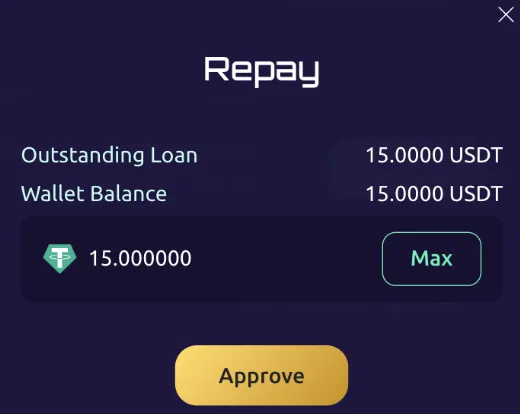
1. Under *Overview*, find the the *Your Assets* box and click the green *Repay* button.
2. A box will pop up asking you how much you want to repay.\
   (*Note: If you wish to repay the entirety of the loan, you can use the max button, and the total amount will be automatically entered into the box.)*

<figure><img src="https://2981697796-files.gitbook.io/~/files/v0/b/gitbook-x-prod.appspot.com/o/spaces%2FsMejAYcEclUBJe5Na8xo%2Fuploads%2FKHOeNJjMhLoqnM2wjrex%2Fimage.png?alt=media&amp;token=08837fa0-f998-4531-8f4a-a1a3383a8535" alt=""><figcaption></figcaption></figure>

3. Click *Approve* and approve the operation in your wallet.

Upon repayment of your loan (in part or in total), this will be reflected in the *Your Assets* summary. Repaying your loan will improve your Health Factor.


# Health Factor

The safety of each user’s collateral and overcollateralized status of their loan is indicated by a numeric value known as the *Health Factor.*

The value of the collateral must always exceed the value of the loan to remain overcollateralized. Should the values of the involved assets change, the Health Factor adjusts accordingly. A higher Health Factor indicates that their collateral is safe from liquidation at that time. Health Factor decreases as the value of the loan approaches the value of the collateral, so a Health Factor of 1 indicates that the value of the loan is approaching the liquidation threshold.

If the health factor drops below 1, the position is at risk of liquidation — the process of selling collateral on the open market to repay the excess value of a borrower’s loan. Borrowers can either deposit additional collateral or pay back enough of their loan to maintain a safe ratio and prevent their collateral from being liquidated.

The Health Factor is calculated based on your total loan-to-collateral ratio, ranging from 100 to 0. A health factor below 1.25 puts you at risk of liquidation. When the health factor hits 1, the borrower's collateral will be liquidated.

To improve their loan’s health, borrowers can repay part or the full amount of the borrowed sum. Alternatively, they can supply more collateral to push the health factor back up above 1.

<br>


# Protocol Parameters

### Collateral Factor

Each asset on Hover has a Collateral Factor, which dictates how much a user can borrow based on the value of their deposit.

e.g. a 72% Collateral Factor means you can borrow up to 72% of the value of your deposit.

### Reserve Factor

The Reserve Factor determines the proportion of interest allocated into an asset's Reserve Pool. The Reserve Pool acts as a safeguard, protecting lenders from borrower default and liquidation issues.

e.g. a 10% Reserve Factor means that 10% of the interest paid by the borrowers of a given asset would be routed to the Reserve Pool.

### Borrow Cap

The Borrow Cap is the maximum amount of a given asset that can be borrowed at a time.&#x20;

e.g. a 2,000,000 Borrow Cap on KAVA means that is the limit for how much KAVA that can be withdrawn at once and in total by all borrowers on Hover.&#x20;

### Close Factor

The Close Factor is the maximum percentage of a borrower’s loan value that can be repaid in one transaction in the event of a liquidation.

e.g. a 50% Close Factor means that if a borrower has an outstanding debt worth $10,000, up to $5,000-worth of their collateral can be liquidated when their health factor drops below 1.

### Interest Rate Model

Hover uses the Jump Rate Interest Model, meaning that our interest rates are adjusted based on asset utilization.\
\
If there is high asset utilization, it indicates a greater demand and usage of the asset within Hover. If that is the case (at a utilization rate of 80%), there will be a significant jump in interest rates to greater incentivize asset deposits and loan repayments.


# Oracles

An oracle is a service that takes off-chain information and transfers it to on-chain contracts.&#x20;

Having timely access to accurate asset prices is essential for Hover's operations. Processes such as the borrowing of assets, liquidations, and interest rate changes require this data to run smoothly.

Hover utilizes real-time data from the [Pyth Network](https://pyth.network/price-feeds) for its markets. Pyth is an oracle network that provides low-latency market data from over 95 first-party publishers. With their innovative pull oracle design, Hover is able to “pull” the latest Pyth price on demand.

Learn more about Pyth from their [website](https://pyth.network/) and [documentation](https://docs.pyth.network/documentation).


# Hover Tokenomics

## The Hover Tokens

Hover uses a three-token model to foster token utility, encourage participation, and drive long-term sustainability.

### HOV

The native Hover token. This is the standard fungible token with a total supply of 1,000,000,000 tokens. HOV can be obtained via token sale or purchased on centralized and decentralized exchanges.

A portion of protocol emissions is received in HOV. Upon staking, HOV is converted to esHOV at a 1:1 ratio.

### esHOV

The staked, non-transferable token that offers rebates on borrowing, lending, and liquidation fees, as well as governance voting rights through the Hover Staking Program.\
\
Rebates and protocol emissions are received in esHOV, which can be converted to xHOV at a 1:1 ratio upon completion of KYC for eligibility determination.

### xHOV

The staked, non-transferable token that offers rebates on borrowing, lending, and liquidation fees, governance voting rights, and access to Hover Rewards.

Requires KYC onboarding with Quadrata to establish [eligibility](/kyc-and-location-restrictions).

### Token Conversions

Users can stake HOV and convert it to esHOV (or xHOV with KYC) at a 1:1 ratio at any time. However, unstaking esHOV and xHOV and converting 1:1 back to HOV requires a 180 day unstaking period. Users can convert staked HOV to unstaked HOV in as little as 15 days, with a 50% burn penalty. If the user chooses an unststaking period between 15 days and 180 days, a proportional linear amount will be burned.

<br>


# Hover Staking Program

The Hover Staking Program offers rebates on protocol fees as well as governance benefits. Based on the staked amount, stakers qualify for a specific VIP Tier as outlined below. The size of the rebate depends on the VIP Tier and amount being borrowed, supplied, or liquidated. The rebates displayed are percentages off of the fees, not of the full amount borrowed/supplied/liquidated.&#x20;

<table data-full-width="false"><thead><tr><th>VIP Tier</th><th>Staked HOV Threshold </th><th>Borrow Interest Rebate</th><th>Lending Fee Rebate</th><th>Liquidation Fee Rebate</th></tr></thead><tbody><tr><td>VIP 0</td><td>>$10</td><td>20%</td><td>20%</td><td>20%</td></tr><tr><td>VIP 1</td><td>>$50</td><td>25%</td><td>25%</td><td>25%</td></tr><tr><td>VIP 2</td><td>>$500</td><td>30%</td><td>30%</td><td>30%</td></tr><tr><td>VIP 3</td><td>>$2,000</td><td>40%</td><td>35%</td><td>40%</td></tr><tr><td>VIP 4</td><td>>$8,000</td><td>50%</td><td>45%</td><td>50%</td></tr><tr><td>VIP 5</td><td>>$40,000</td><td>55%</td><td>50%</td><td>55%</td></tr><tr><td>VIP 6</td><td>>$200,000</td><td>60%</td><td>55%</td><td>60%</td></tr><tr><td>VIP 7</td><td>>$1,000,000</td><td>65%</td><td>60%</td><td>65%</td></tr></tbody></table>

Users can opt to undergo KYC if they wish to hold xHOV to receive Hover Rewards. However, KYC is not required to benefit from the Hover Staking Program.

Any esHOV or xHOV being [unstaked](/hover-tokenomics#token-conversions) does not count towards the user’s VIP Tier threshold. Additionally, during the unstaking period, xHOV only earns ¼ of the Hover Rewards.

### Hover Rewards

Upon passing an [optional KYC](https://app.gitbook.com/o/0jdyiaxX7lab9f5Jsg6B/s/sMejAYcEclUBJe5Na8xo/~/changes/3/optional-kyc) check to determine eligibility, users can convert their esHOV to xHOV at a 1:1 ratio. Holding xHOV grants access to Hover Rewards.\
\
Rewards are accumulated every block and distributed in weekly epochs in a mix of xHOV and supported assets.


# KYC and Location Restrictions

In order to maintain regulatory compliance, users located in the countries listed below are not permitted to use Hover's services. As such, Hover has implemented IP address restrictions for access to the application.

KYC is not required to participate in the Genesis Pools, to supply or borrow on Hover, to purchase the HOV token, to stake the HOV token, or to participate in the Hover Staking Program. However, KYC will be required to to qualify for Hover Rewards or to participate in the Token Sale. &#x20;

This optional process was implemented to ensure that only users from approved countries have access to the Hover Rewards Program and the Token Sale. Users from the countries listed below are ineligible to participate.

Hover has partnered with Quadrata to handle the KYC process. Quadrata is GDPR-compliant and does not store any personally identifiable information (PII) on-chain. Upon approval, users are issued a non-transferable NFT, which Hover’s smart contracts query to determine eligibility. Hover does not have access to any PII.&#x20;

Quadrata’s onboarding process can be completed in a few minutes and requires the user's name, date of birth, email address, a government-issued ID, and a self-portrait. Once approved, users can convert their esHOV to xHOV with their approved wallet.

### Location Restrictions

| Canada                           | Mali          |
| -------------------------------- | ------------- |
| Belarus                          | Myanmar       |
| Burundi                          | Nicaragua     |
| Central African Republic         | North Korea   |
| China                            | Russia        |
| Cuba                             | Serbia        |
| Cyprus                           | Somalia       |
| Democratic Republic of the Congo | South Sudan   |
| Eritrea                          | Sudan         |
| Haiti                            | Syria         |
| Iran                             | Ukraine       |
| Iraq                             | United States |
| Kosovo                           | Venezuela     |
| Lebanon                          | Yemen         |
| Libya                            |               |
|                                  |               |
|                                  |               |
|                                  |               |
|                                  |               |


# Governance

As Hover matures, governance will play an increasingly critical role. However, until that point, the team of core contributors will take the lead in making protocol decisions.

When the governance phase commences, users will need to hold staked HOV (either esHOV or xHOV) to participate in governance voting.


# Risk and Security

### Risk Management

Hover is engaging with the experienced team at [Ledger Works](https://www.lworks.io/) to assess market risk and manage protocol parameters to increase capital efficiency while keeping user funds secure. Their team provides real-time continuous market surveillance and uses deterministic financial models, stochastic modeling, and network-wide simulations to assist with minimizing Hover's exposure to market risks.

### Audits

Hover has had the following smart contract audit completed by WatchPug in August 2023.&#x20;

{% file src="/files/uc8uU5vnZ2jhnuxlgZvB" %}


# Contracts

### HOV Tokens

| HOV   | 0xCe82db637A2D750380ef27063518eAa263fbe10E |
| ----- | ------------------------------------------ |
| esHOV | 0xD3452d932A81C1221C1Ba331852554cBBEF8c652 |
| xHOV  | 0xD6aDF6284b657c3c5b0d0Fa69BDB03afb8a98c76 |

### hTokens

| hKAVA | 0xb51eFaF2f7aFb8a2F5Be0b730281E414FB487636 |
| ----- | ------------------------------------------ |
| hATOM | 0x1Bf92bE674483D54A8E3A589e456c39eAC4339bd |
| hUSDT | 0xcE86EBc669BBf07A64A0a55BB105Cc2B5B5d1961 |